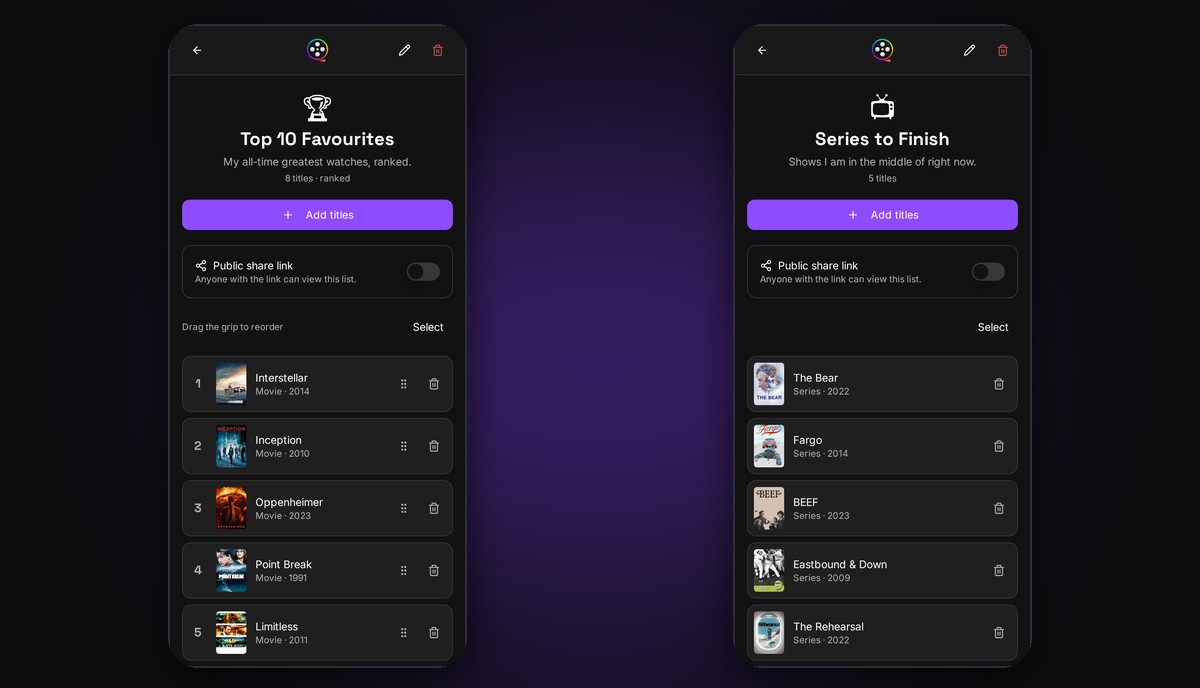
Create your own movie and series lists with emoji icons, drag titles into your definitive Top 10, and share any list with a public link – no account needed to view it.
One watchlist was never enough. You have your all-time favourites, the horror marathon you're planning for October, the comfort rewatches, the "watch before the sequel" pile. Starting today, FlickTrackr has Custom Lists – your own collections of movies and series, built exactly the way you think about them.
Build lists for any mood. Create a list, give it a name and an emoji icon, and start adding titles – movies and series, watched or not. Your Top 10, a date-night shortlist, every Best Picture winner, the ultimate 90s action ranking… if you can name it, you can list it. Find your lists anytime under Lists in the bottom navigation.
Rank your favourites. Some lists have an order that matters. Flip on ranked mode and drag titles into place to keep a definitive Top 10 that's always up to date – reorder anytime as new favourites earn their spot.
Share with a link. Make any list public and send the link to anyone. Friends can browse your list on the web without an account – perfect for settling "what should I watch?" debates or sharing your picks for the season. Your private lists stay private; sharing is always opt-in per list.
Free vs Premium. Free: create 1 custom list with up to 25 titles. Premium: unlimited lists, ranked ordering, and priority support for future list features. Premium subscriptions directly support the development of FlickTrackr and features like this one.
Custom Lists are live now on iOS, Android, and the web. Open the app, head to Lists, then Custom Lists, and create your first one.